Thinking about a smart thermostat? Here are straight answers to the questions that come up before buying one.
Will a smart thermostat work with my heating and cooling system?
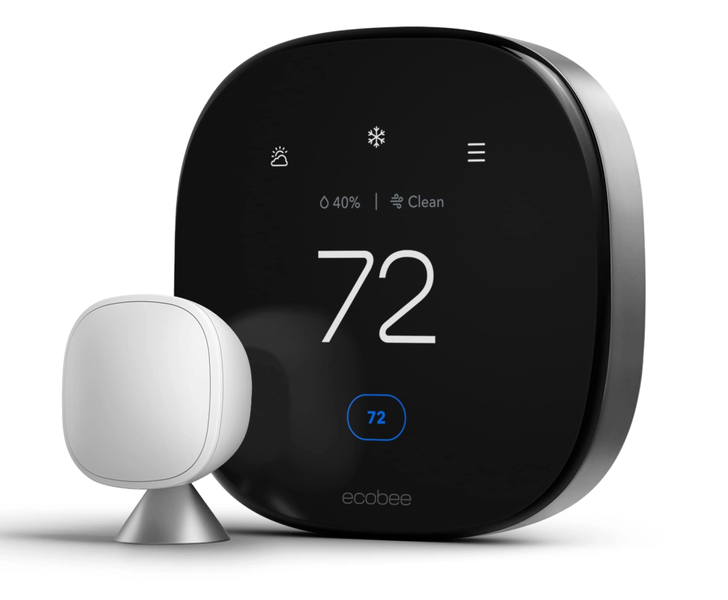
It depends on your system, and there is an easy way to check before you buy. Google says its Nest thermostats are designed to work with most 24-volt heating and cooling systems, even older ones, across common fuel types – but not everything qualifies: proprietary systems, millivolt heaters and high-voltage systems like electric baseboard heating are listed as incompatible. Google offers a free online Compatibility Checker, and its app walks you through a compatibility check during setup.
Wiring matters too. Some smart thermostat setups need a “C-wire” (a common wire that delivers continuous power). Google notes that not all homes have one, that Nest thermostats often work without it, and that some systems require one or a power connector. The bottom line: compatibility is a per-home question, and checking takes a few minutes before you commit.
Source: Google Nest Help, “Nest thermostat compatibility” – https://support.google.com/googlehome/answer/9246656
What is Z-Wave, and why do people mention it?
Z-Wave is a wireless communication protocol built specifically for smart home devices. Instead of every device joining your home Wi-Fi, Z-Wave devices talk to a central hub over their own mesh network – devices can relay signals to one another to extend coverage through the house. The practical benefit: the link between a device and its hub does not depend on your internet connection. If a smart thermostat comes as part of a monitored home security system, a protocol like Z-Wave is often how it talks to that system.
Source: Z-Wave Alliance, “What is Z-Wave?” – https://z-wavealliance.org/what-is-z-wave/
What happens if my Wi-Fi goes down?
Behavior varies by brand and model, so here is what Google documents for Nest thermostats: when a Nest thermostat loses its Wi-Fi connection, you can still use the thermostat itself to set the temperature in your home. What you lose is the app – remote control from your phone stops – and Google notes that some other features may also be unavailable until the connection returns.
Source: Google Nest Help, “Troubleshoot your offline Nest thermostat” – https://support.google.com/googlehome/answer/9243422
What happens in a power outage?
If your home loses power, heating and cooling equipment stops along with everything else, unless the home has backup power. For the thermostat itself, Google’s guidance for Nest thermostats says: “If you recently experienced a power outage, your thermostat will run on its internal battery until power is restored.” Google does not state how long the battery lasts during an outage.
Source: Google Nest Help, “Troubleshoot your offline Nest thermostat” – https://support.google.com/googlehome/answer/9243422
Can I control it when I am not home?
Yes, when your home internet is working. ADT’s smart thermostat page says you can remotely adjust, automate, schedule and monitor your home’s temperature from a phone or computer, and set up custom notifications that alert you if your home gets too cold or too warm – useful for catching a heating failure before pipes freeze.
Source: ADT, “Smart Thermostats” – https://www.adt.com/smart-thermostat
Does a smart thermostat work with a home security system?
It can. ADT describes custom scenes – like At Work, At Home or On Vacation – where one tap can set your home’s temperature, adjust lights and arm your security system together, plus emergency automations that respond if a fire or CO sensor is triggered. That kind of integration is one reason homeowners choose a thermostat offered as part of a monitored security system rather than a standalone one.
Source: ADT, “Smart Thermostats” – https://www.adt.com/smart-thermostat
Who installs it?
Many homeowners install a smart thermostat themselves, but Google recommends professional installation for some setups, including dual-fuel systems and dual-transformer systems, because their wiring can be complicated. If you would rather have it handled for you, ShieldStreamz can connect you with SafeStreets, an ADT Authorized Provider, for a professionally installed, monitored system that can include a smart thermostat.
Source: Google Nest Help, “Nest thermostat compatibility” – https://support.google.com/googlehome/answer/9246656
Questions about smart thermostats or a monitored system for your home? Call (855) 585-8177 or visit shieldstreamz.com/smart-thermostat/.